Hand Writing Memo (Cursive) download for android 10 (Quince Tart)
APK file Handwriting MemoSchedule St. 1.2.5 compatible with Android 10How to install APK / APKS / OBB file on Android
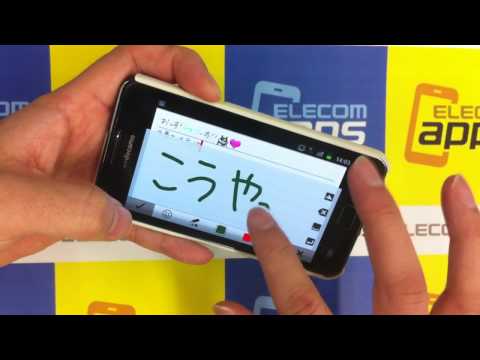

Useful Hand Write Note. Useful for practice cursive writing. Learn for cursive writing. It's FREE!
Have you ever been frustrated by unfamiliar smartphone character input?
With "Handwriting Memo for Schedule St.", you can input characters by drawing them (Hand Writing) on the screen.
Paint apps and the like can yield a little bit of rough character input, but with "Handwriting Memo for Schedule St.", the character input line takes up half of the screen. This lets you enter large characters, and input detailed characters cleanly. Try hand writing with "Handwriting Memo".
◆Type small characters cleanly in the ample input area
Making the input area line larger allows clean input of small characters.
◆Cursive Writing is possible
Cursive writing is very fast.
It's very useful for practice cursive writing.
◆50 icons are included to insert into hand write memo
Not just handwriting. 50 icons have been prepared to insert into texts. By inlaying icons, you can make dynamic hand write notes. There are additional icons available for purchase as well. If the standard icons are insufficient, please try one of our various other icons.
◆Changeable wallpaper designs
You can change the wallpaper design of hand write notes. You can use different ones to suit your mood or purpose.
◆Hand Writing Note delivery to email or apps
You can attach hand write notes to email as an image, or send it to other applications. You can attach and send hand write letters packed with feelings via email.
◆Connect to Schedule Street appointments
By purchasing paid items such as the icon pack, you can use hand write notes as expanded info in the personal organizer app "Schedule St.". This will allow you to attach hand write notes to appointments with ease.
[Support OS]
Android OS 2.3/3.0/3.1/3.2/4.0/4.1/4.2/4.3/4.4/5.0
[ELECOM Apps Web Site]
http://app.elecom.co.jp/en/
[Twitter]
http://twitter.com/ELECOM_Apps
[Facebook]
http://www.facebook.com/ELECOM.Applications
- LicenseFree
- File nameHandwriting MemoSchedule St.
- File Version1.2.5
- Package namejp.co.elecom.android.elenote.handwrite
- Size2.59 MB
- UploadedJuly 1, 2017
- Android2.1 or later
- CategoryProductivity
- DeveloperELECOM CO.,LTD.
- Developer site
- Developer emailelecomapps@elecom.co.jp
- md5 hashe402952406b72d4de2cd43e31c50cc09
- Architecture-